Secure the rooms that matter, not the wards.

A hospital is open to the public by design, which makes blanket monitoring both impractical and wrong. The security problem is concentrated in specific rooms — pharmacy, records, plant, stores — and in the hours when corridors are empty.

What makes this estate hard to watch

Public by design

Entrances and corridors are open to anyone. The controlled space is a small subset, and that is where configuration should go.

Staff work alone at night

Service corridors, plant rooms and stores are often worked single-handed outside core hours.

Privacy is a hard constraint, not a preference

Patient areas carry obligations that make a general-purpose analytics rollout inappropriate.

From the trigger to the evidence

Which of these apply to you, and which cameras can carry them, is what the site survey establishes before anything is proposed.

01

Access to a controlled room out of hours

Trigger

A badge opens pharmacy, records or a store outside the agreed window.

Camera context

The camera at that door captures the frame at the read.

Operator review

Whether the person matches the credential on record.

What happens next

Acknowledged, or escalated with the clip retained for the audit.
02

Presence in a plant or service area

Trigger

A person detected inside a marked area during hours it should be empty.

Camera context

The detection frame with the area drawn on it.

Operator review

Engineer on a call-out, or unexplained.

What happens next

Alert to the duty security lead with the frame.

03

Person down in a low-traffic corridor

Trigger

A person detected on the floor where nobody may pass for some time.

Camera context

The frame and the clip around it, with the location.

Operator review

Raised immediately rather than found on the next round.

What happens next

Alert to the nominated responders. Supplementary to your clinical and emergency procedures, never a replacement for them.

04

Door held open on a secure store

Trigger

A controlled door stays open past its timer.

Camera context

The doorway view for the open period.

Operator review

A delivery, or a door defeated.

What happens next

Logged with footage for the controlled-drugs or stock audit.

Built around what you already run

Scoped to rooms, not to wards

Areas are drawn deliberately narrowly. Patient-facing space is left out of configuration unless you have a specific, lawful reason and have approved it.

Processing and evidence stay on site

The appliance runs on your own network; continuous video does not leave the building.

Access integration against your platform

Door events read from your existing system during onboarding, with no control over the doors themselves.

Retention is yours to set

How long evidence is kept, and who can see it, follows your own information-governance policy.

Video analytics here supplement clinical, emergency and certified life-safety systems. They do not replace them, and nothing on this page should be read as a clinical or emergency-response capability.

One appliance. NVR + AI + management.

Camera streams, recording, playback, AI events, evidence clips, alerts, reports, users and roles and camera health — centralised in one appliance inside your premises. Faces, clips and reports stay on site.

Input IP / Wi-Fi / compatible existing cameras
Network PoE / network
On premises PARVEK Appliance Recording · AI detection & rules · management
Mobile alertVoice warningLight / floodlightSiren / hooterEvidence clipReports
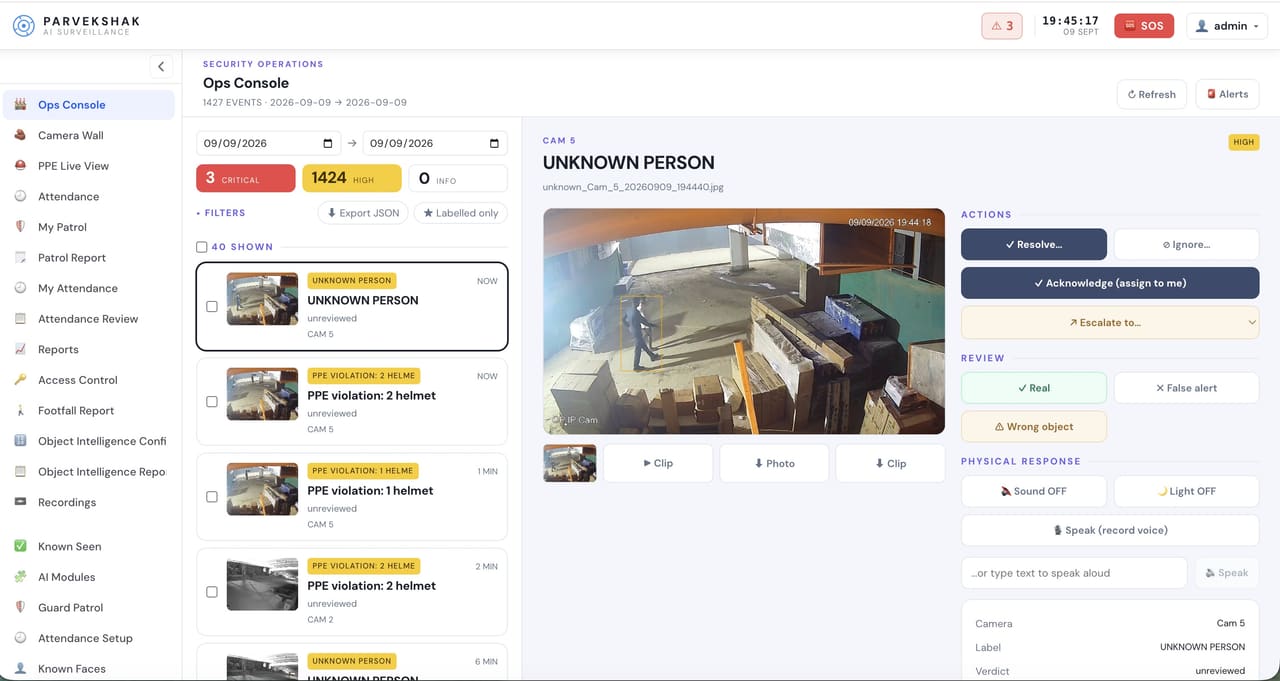
The PARVEK ops console: an event list on the left, the selected UNKNOWN PERSON detection frame in the centre, and resolve, escalate and physical-response controls on the right
Ops console — events, evidence and response in one place
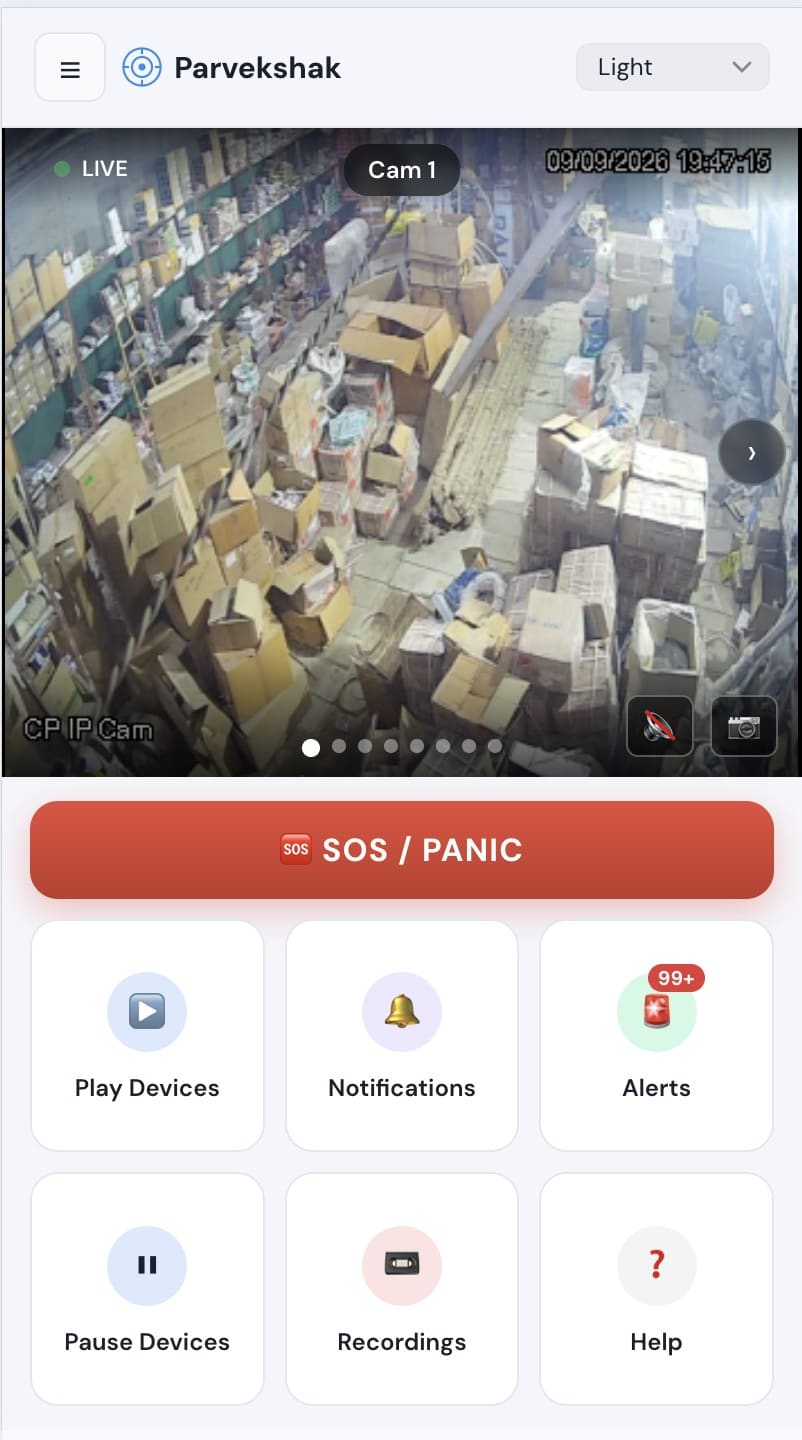
The PARVEK mobile app showing a live camera view, an SOS/panic button, and tiles for devices, notifications, alerts and recordings
Mobile app — live view, alerts and SOS
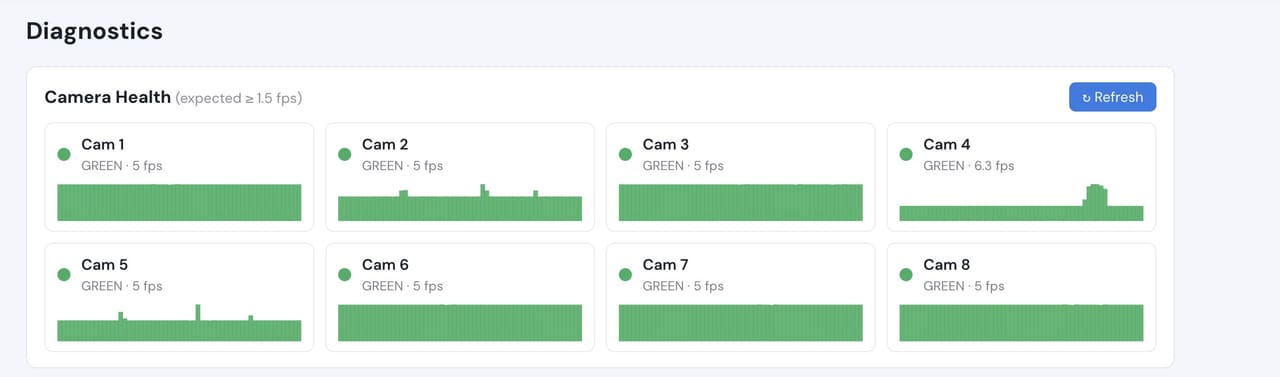
Camera health diagnostics listing eight cameras with their frame rates, all green
Camera health — offline and degraded cameras flagged

Camera count, retention and storage are specified per appliance configuration and confirmed during the assessment.

What to measure on your own site

We do not publish improvement percentages, because none have been measured across a fleet and yours would not match them anyway. What a bounded proof of concept gives you is your own numbers, on your own footage:

  • Exception volume on controlled doors per week
  • Median time from an exception to the relevant footage being on screen
  • Whether the camera on each controlled door can resolve a face at the reader
  • Time to produce an evidence pack for a controlled-stock audit
  • Whether the configured areas are drawn tightly enough for your governance review

Frequently Asked Questions

Will this monitor patients?

Not in any configuration we would recommend or build. The useful scope is controlled rooms and service areas. Patient-facing space stays out of it unless you have a specific lawful basis, documented and approved on your side first.

Where does the data live?

On an appliance on your own network, with retention you set. The data flow is written down during the assessment so your information-governance review has something concrete to approve.

Is person-down detection a medical alert?

No. It is a security event that tells a responder someone appears to be on the floor in a particular place. It supplements your clinical and emergency procedures and is not a medical device.

Can we start with just the pharmacy?

Yes, and that is usually the right start. A small number of controlled doors, proven on your own footage, tells you more than a site-wide rollout.

AI surveillance and analytics are technology-assisted and do not guarantee prevention or detection of every security incident or 100% accuracy.

Start with a site survey

Tell us what the site is, what it runs and what you need it to catch. The survey establishes whether your cameras can carry the use case — and from there, a proof of concept runs it on your own footage.