From live video to security action
PARVEK turns live camera feeds into actionable security intelligence. Its AI capabilities are designed to detect what matters, understand context and help security teams respond.
6 capabilities
Identify people, vehicles, objects and security events as they happen.
6 capabilities
Add identity, context, movement and event intelligence to live video.
6 capabilities
Trigger alerts, sirens, speakers, lights, guard workflows and evidence when action matters.
18 in total. Grouped by what the system does with what it sees, rather than presented as one long undifferentiated list.
Capability reference
Each capability states what it does, where it helps, a real example and the response that can be configured for it. Not every capability is enabled on every deployment.
Detect
Identify people, vehicles, objects and security events as they happen.Person Detection
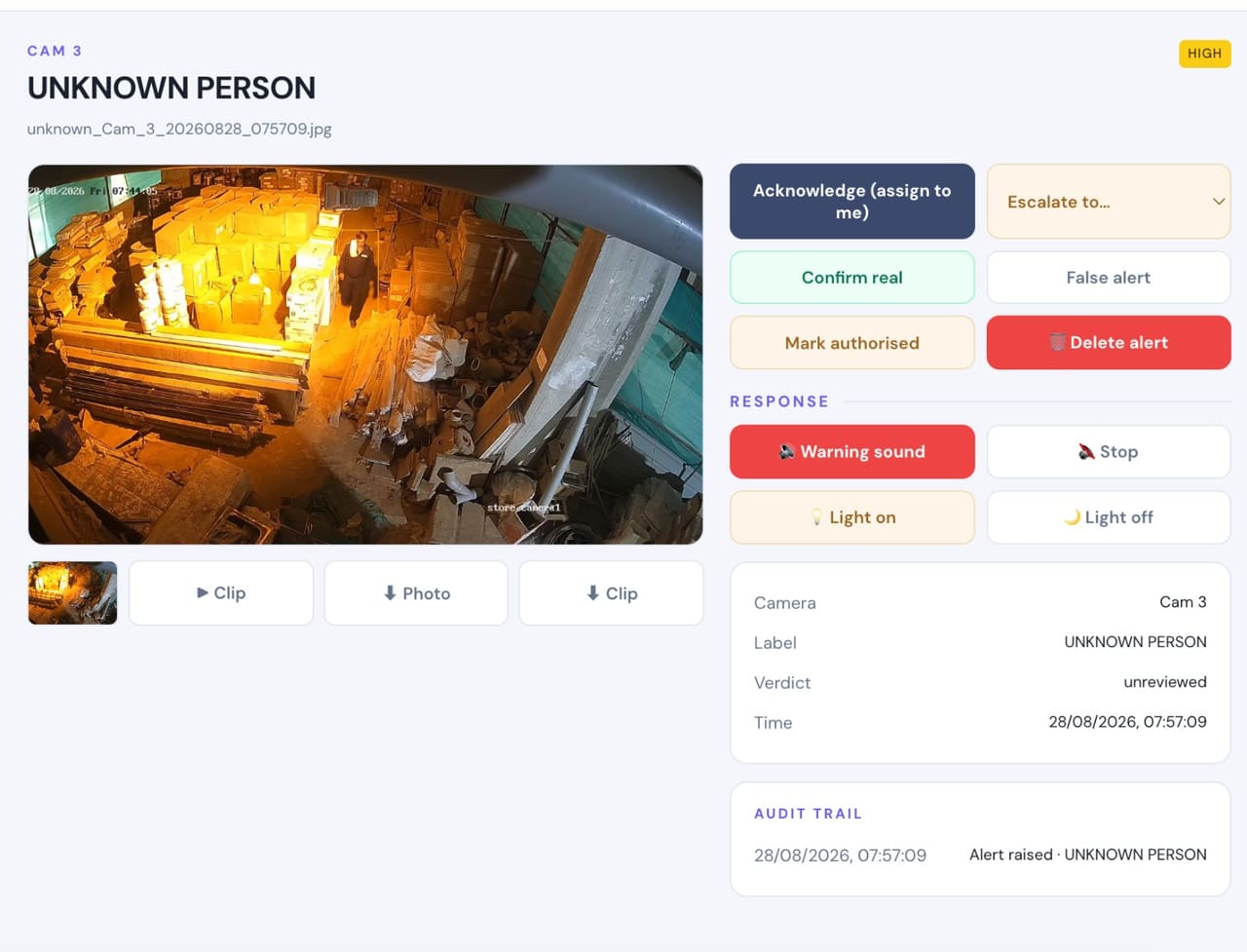
- Detects
- A person in the camera view, separated from the movement that is not a person.
- Where it helps
- Perimeters, entrances, yards, corridors and any area that should be empty at certain hours.
- Example
- Someone crosses a boundary wall at 2:50 AM and walks toward the building.
- Configurable response
- Alert with the frame and clip · voice warning, light or siren where configured.
Vehicle Detection
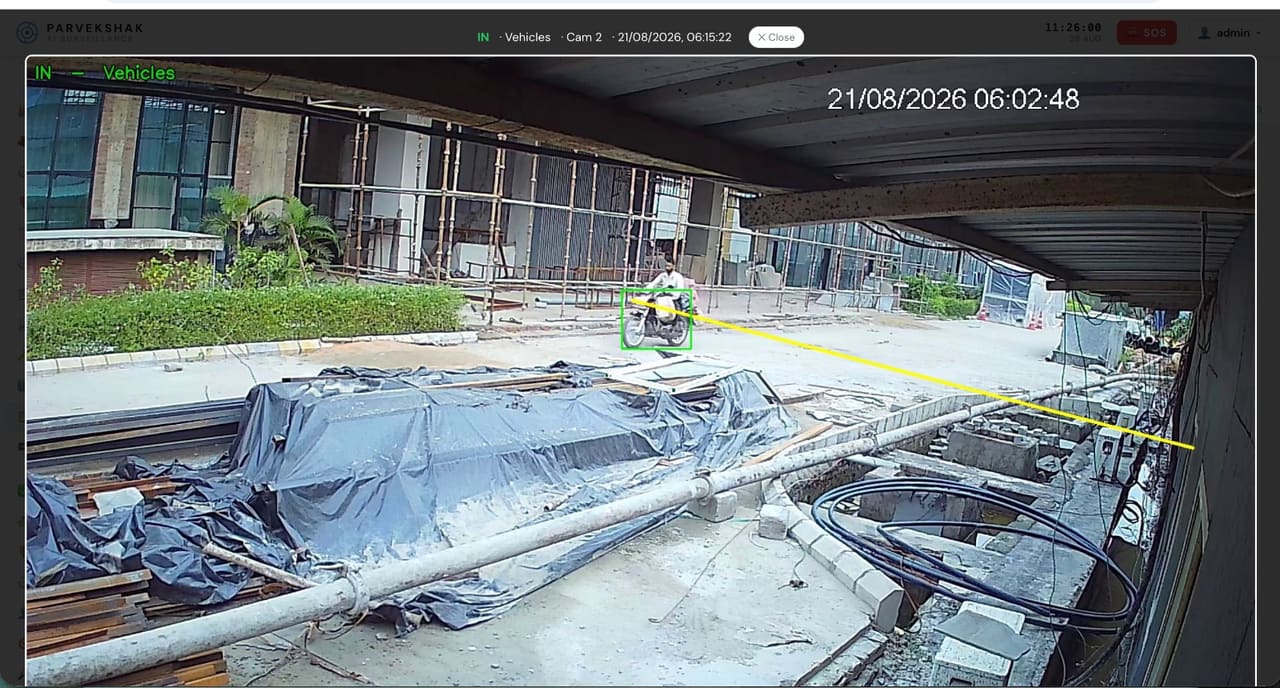
- Detects
- Vehicles entering, leaving or present in an area, including crossings of a line you draw.
- Where it helps
- Gates, parking, loading areas, service entries and yards.
- Example
- A vehicle enters the yard at an hour with no scheduled movement.
- Configurable response
- Timestamped frame per crossing · in/out counts · gate movement report.
Fire & Smoke Detection
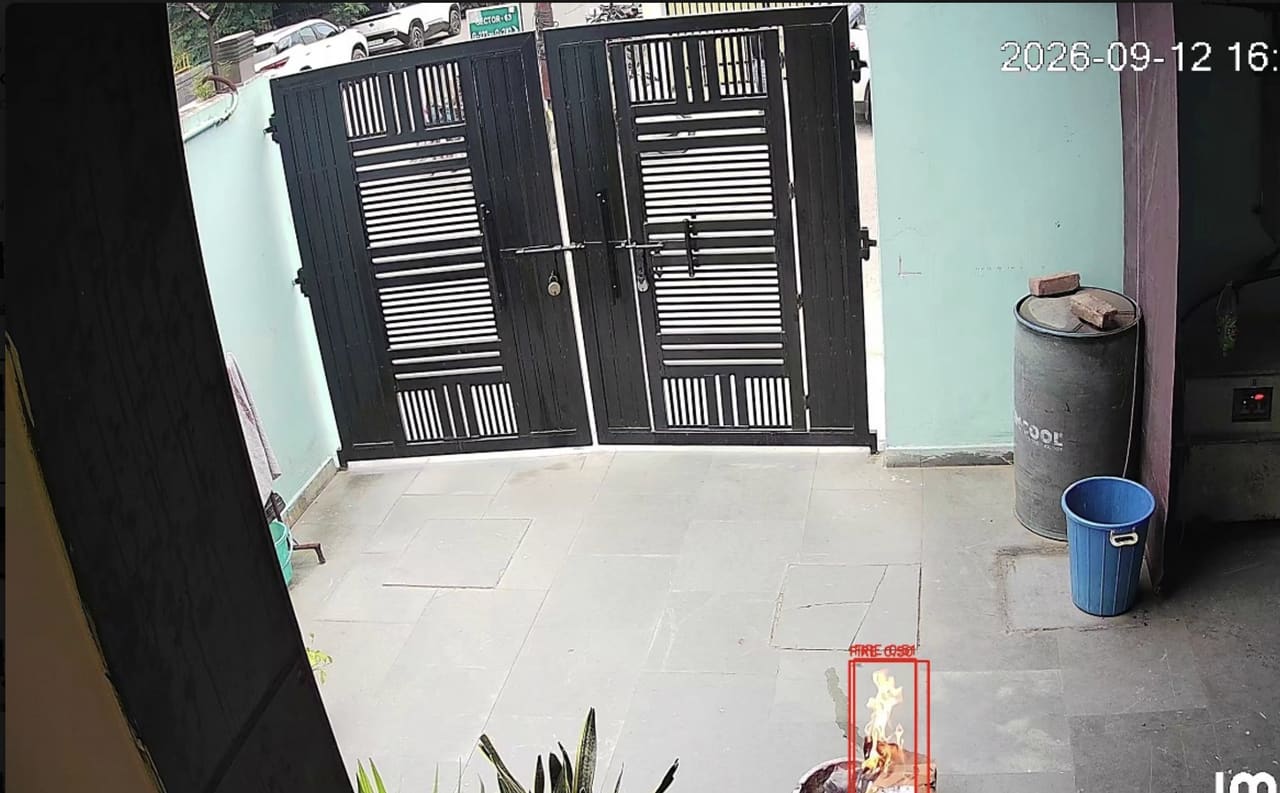
- Detects
- Visible flame and smoke in the camera view.
- Where it helps
- Plant rooms, stores, kitchens, parking, high bays and open yards where heat takes time to reach a detector.
- Example
- A fire starts in a store room overnight with nobody on that floor.
- Configurable response
- Critical alert with clip · maintenance notified · horn where configured.
Fall Detection
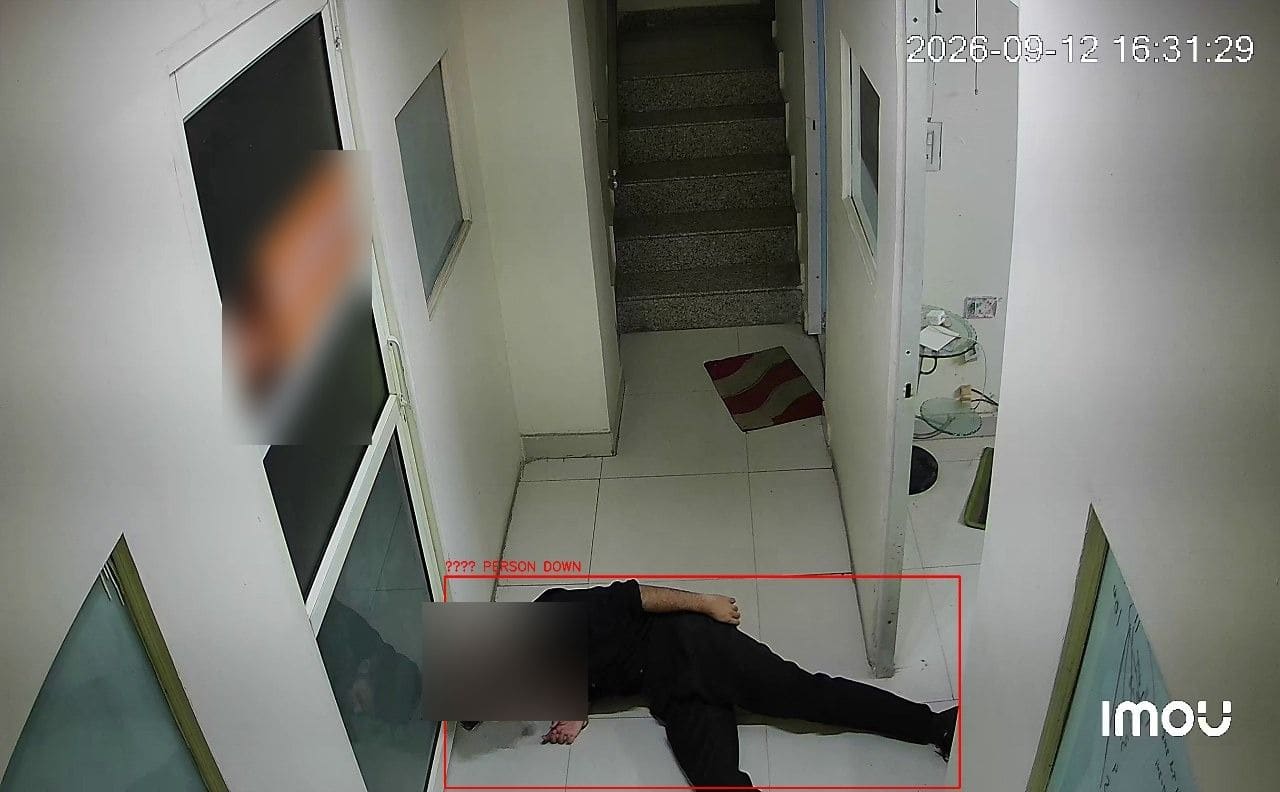
- Detects
- A person collapsing or lying on the floor, from skeleton-based analysis.
- Where it helps
- Stairwells, basements, wards, plant rooms and night shifts where nobody may be watching.
- Example
- A lone operator collapses in a plant room during a night shift.
- Configurable response
- Immediate alert with clip · voice announcement where configured.
Occupancy & Crowd Monitoring
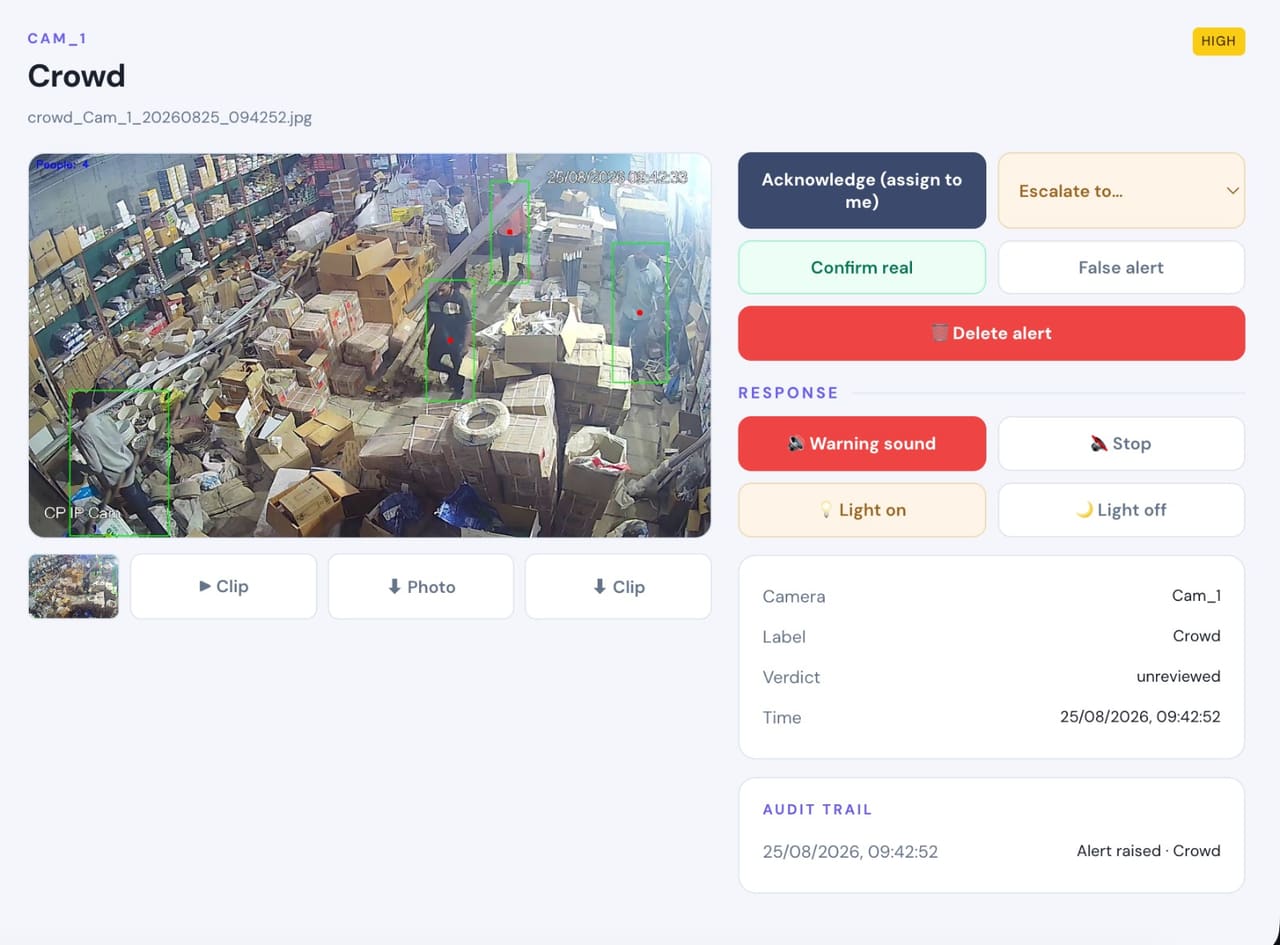
- Detects
- How many people are in an area, and when that exceeds the limit you set.
- Where it helps
- Gates, lobbies, canteens, waiting areas, work bays and meeting spaces.
- Example
- A gathering builds at the main gate during a shift change.
- Configurable response
- Alert with the live count and clip · occupancy trend per area and shift.
Intrusion & Restricted-Area Detection
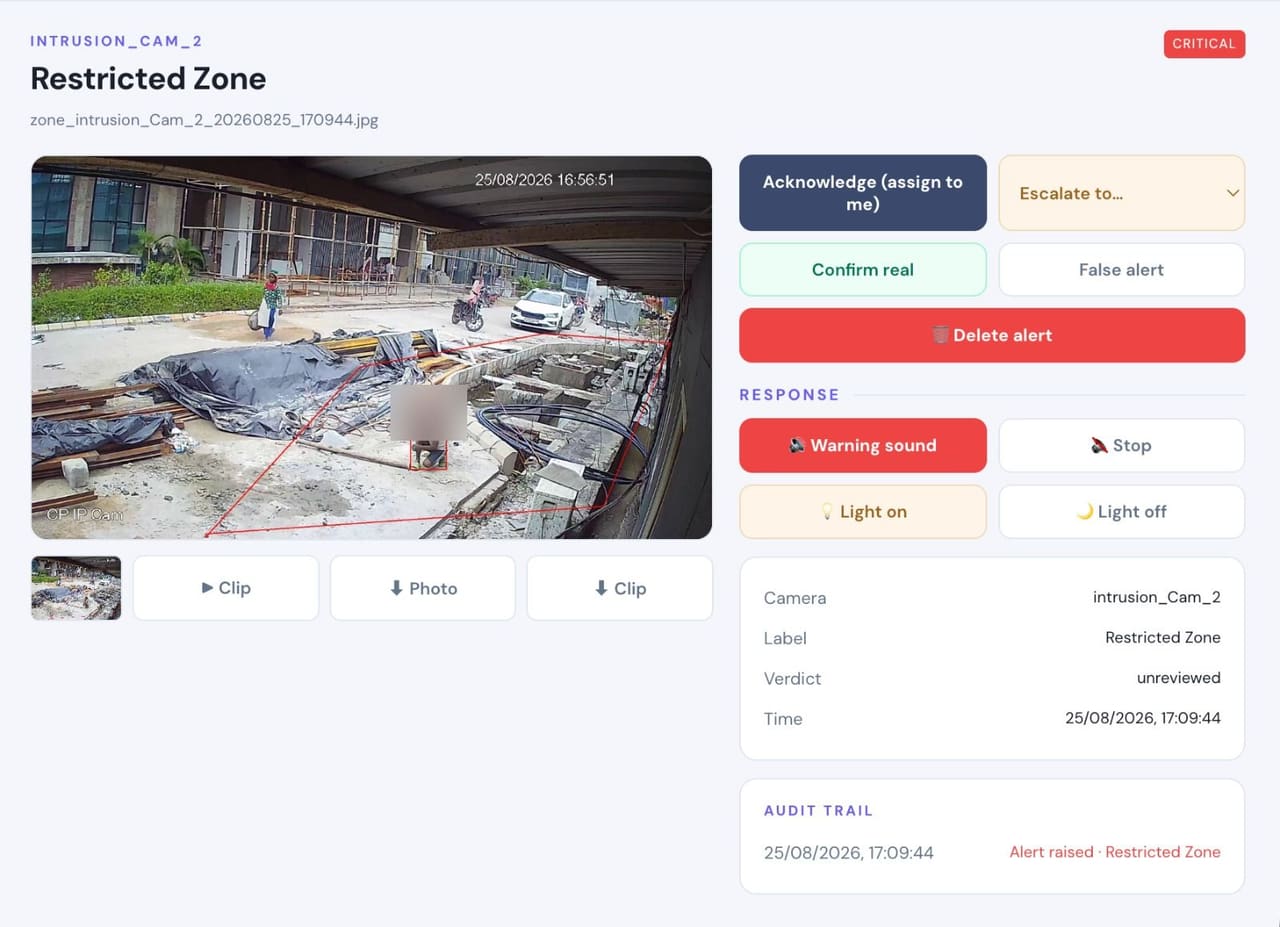
- Detects
- A person inside an area you have marked, during the hours it is off limits.
- Where it helps
- Plant rooms, stock racks, cash offices, server rooms, docks and perimeters.
- Example
- A person stands at the stock racks after the permitted window has closed.
- Configurable response
- Local voice warning · light in that area · silent alert and clip to the desk.
Understand
Add identity, context, movement and event intelligence to live video.Face Recognition
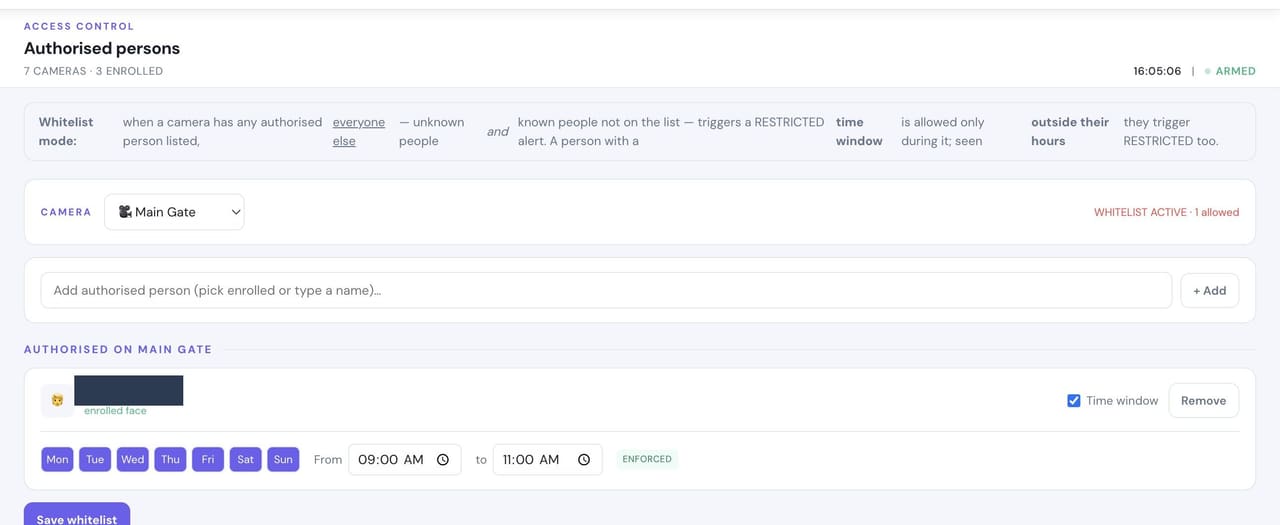
- Detects
- Enrolled people, so the staff and contractors who belong there are known rather than flagged.
- Where it helps
- Main gate, reception, lobby and floor entrances.
- Example
- A regular contractor arrives at 9 AM and is recognized instead of raising an intruder alert.
- Configurable response
- Named event · silent log entry · notification where you want one.
Person Re-Identification
- Detects
- The same person across cameras and over time, without relying on a clear face in every frame.
- Where it helps
- Multi-camera sites where someone moves between areas — corridors, yards, floors.
- Example
- A visitor enters at reception and is followed through to a restricted corridor as one event, not five.
- Configurable response
- Events linked into a single visit · the path through the site available as evidence.
Vehicle Identification
- Detects
- Vehicle attributes — type, and where the camera supports it, distinguishing characteristics.
- Where it helps
- Gates, weighbridges, parking and dispatch.
- Example
- A truck returns to the dock twice in a shift when the paperwork shows one visit.
- Configurable response
- Vehicle events with the frame · gate log for review.
License Plate Recognition
- Detects
- The number plate of a vehicle, read and logged against the crossing.
- Where it helps
- Gates, parking entries and dispatch, where the camera, lens, angle and lighting suit plate capture.
- Example
- A vehicle enters at night and you need the plate, not just a count and a frame.
- Configurable response
- Plate logged with the entry · searchable gate log · alert on a listed plate where configured.
Behavior & Context Analysis
- Detects
- How a person is moving — lingering, pacing, approaching a boundary — rather than only that they are present.
- Where it helps
- Perimeters, racks, ATMs, entrances and quiet corridors where presence alone is not the signal.
- Example
- Someone waits beside the boundary for several minutes without approaching the gate.
- Configurable response
- Escalating alert once your time threshold is met · voice warning · evidence clip.
Identity-Aware Event Intelligence
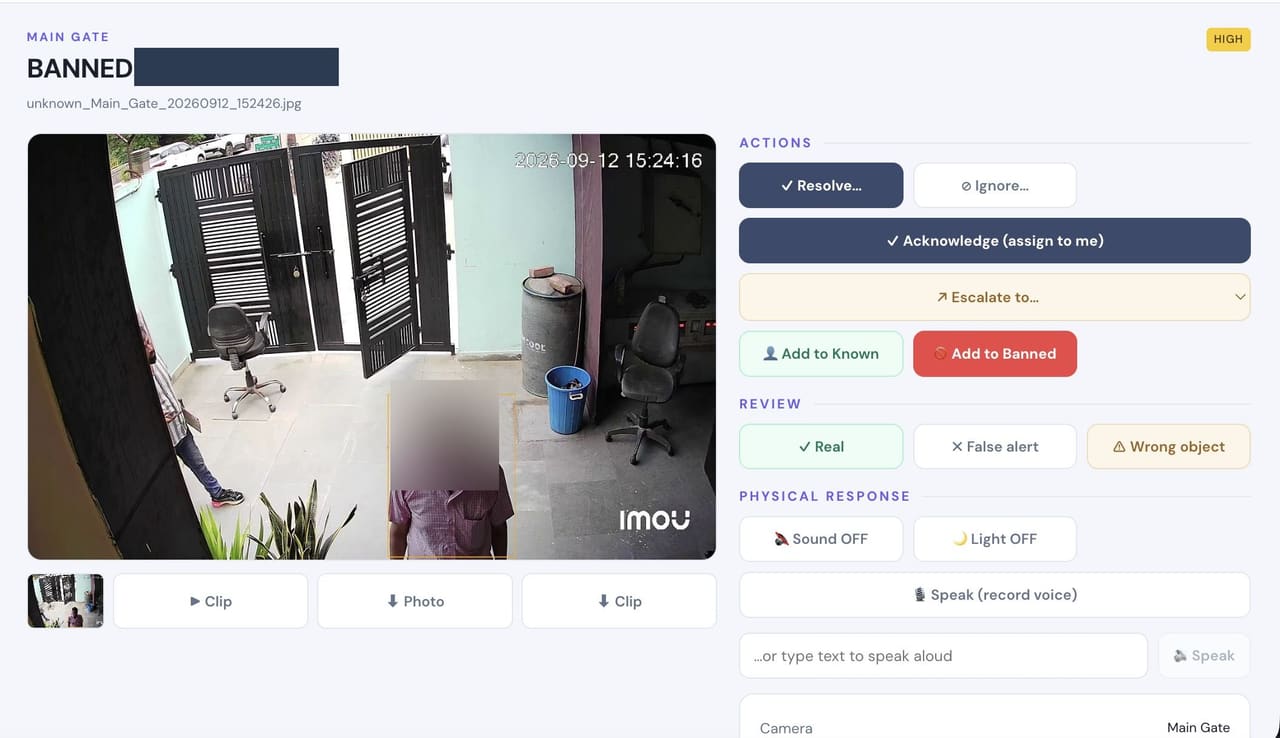
- Detects
- Who an event involves, not just that it happened — including matches against a watchlist you maintain.
- Where it helps
- Entrances, visitor areas and any zone with a named list of who may enter.
- Example
- A barred former contractor returns to the site and is matched at the gate.
- Configurable response
- Alert with the matched photo so the desk confirms before acting · the list stays on your appliance.
Act
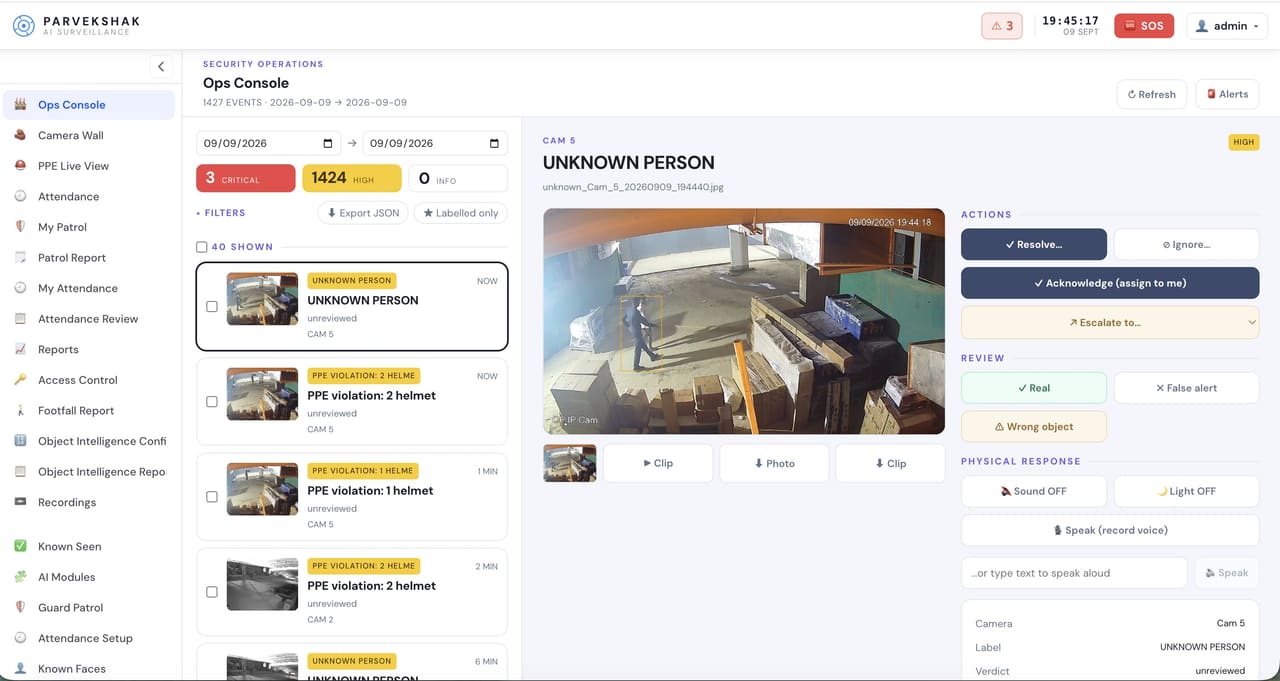
Trigger alerts, sirens, speakers, lights, guard workflows and evidence when action matters.Real-Time Alerts
- Detects
- Every configured event, delivered while it is still happening.
- Where it helps
- The security desk, the operations console and the mobile app.
- Example
- A restricted-area breach reaches the desk in seconds, with the frame that triggered it.
- Configurable response
- Alert with snapshot and clip · acknowledge, resolve or escalate from the console.
Siren & Speaker Integration
- Detects
- Not a detection — the response. A voice warning or audible alarm driven by the event.
- Where it helps
- The specific area that was breached, rather than across the whole site.
- Example
- The speaker in that room challenges the person while they are still standing there.
- Configurable response
- Local voice warning · recorded or live talk-down · audible escalation where the site permits it.
Floodlight & Response Integration
- Detects
- Not a detection — lights and other devices switched by the appliance when a rule matches.
- Where it helps
- Perimeters, yards, driveways and any dark area where light is both deterrent and evidence.
- Example
- The area lights up as someone crosses the boundary, and the camera gets a usable image.
- Configurable response
- Light or floodlight on · relay-driven devices switched · all logged against the event.
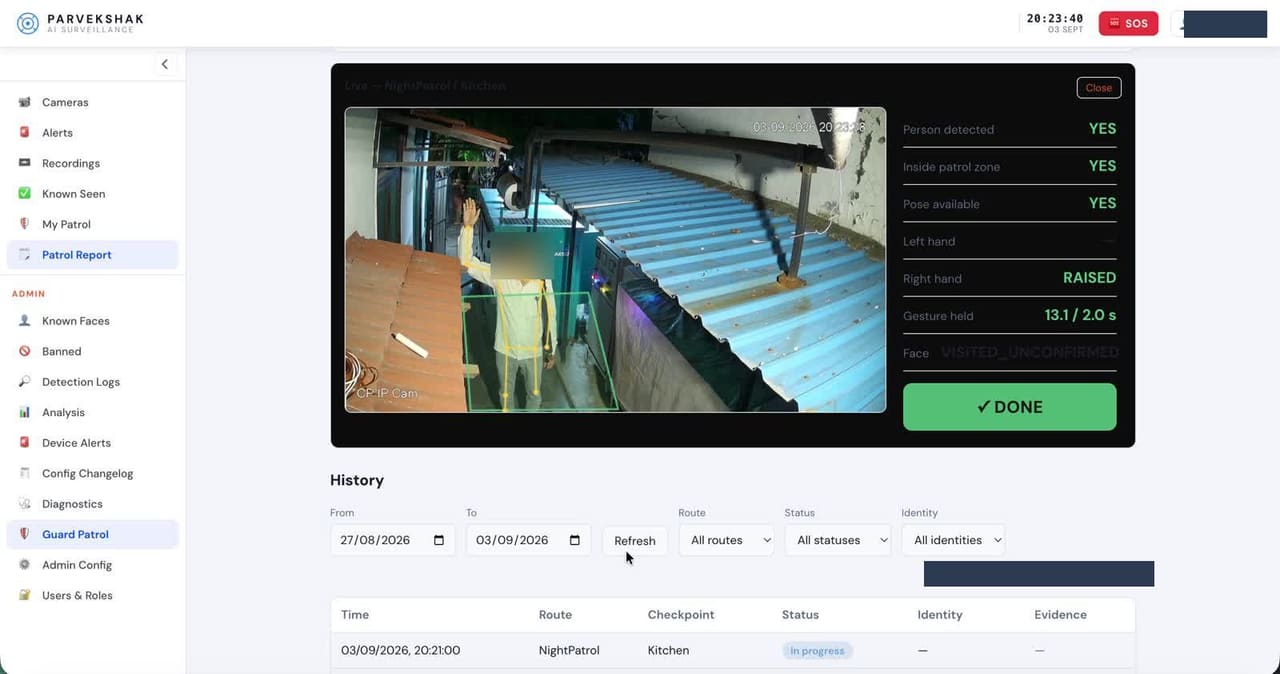
Guard Workflows
- Detects
- Patrol checkpoints confirmed by the guard on each round, and attendance at the post.
- Where it helps
- Checkpoint cameras along the patrol route, security desks and reception posts.
- Example
- A checkpoint is missed on the 3 AM round, or a desk is left unattended beyond the allowed window.
- Configurable response
- Supervisor alert · patrol log of who was where and when · occupancy report per shift.
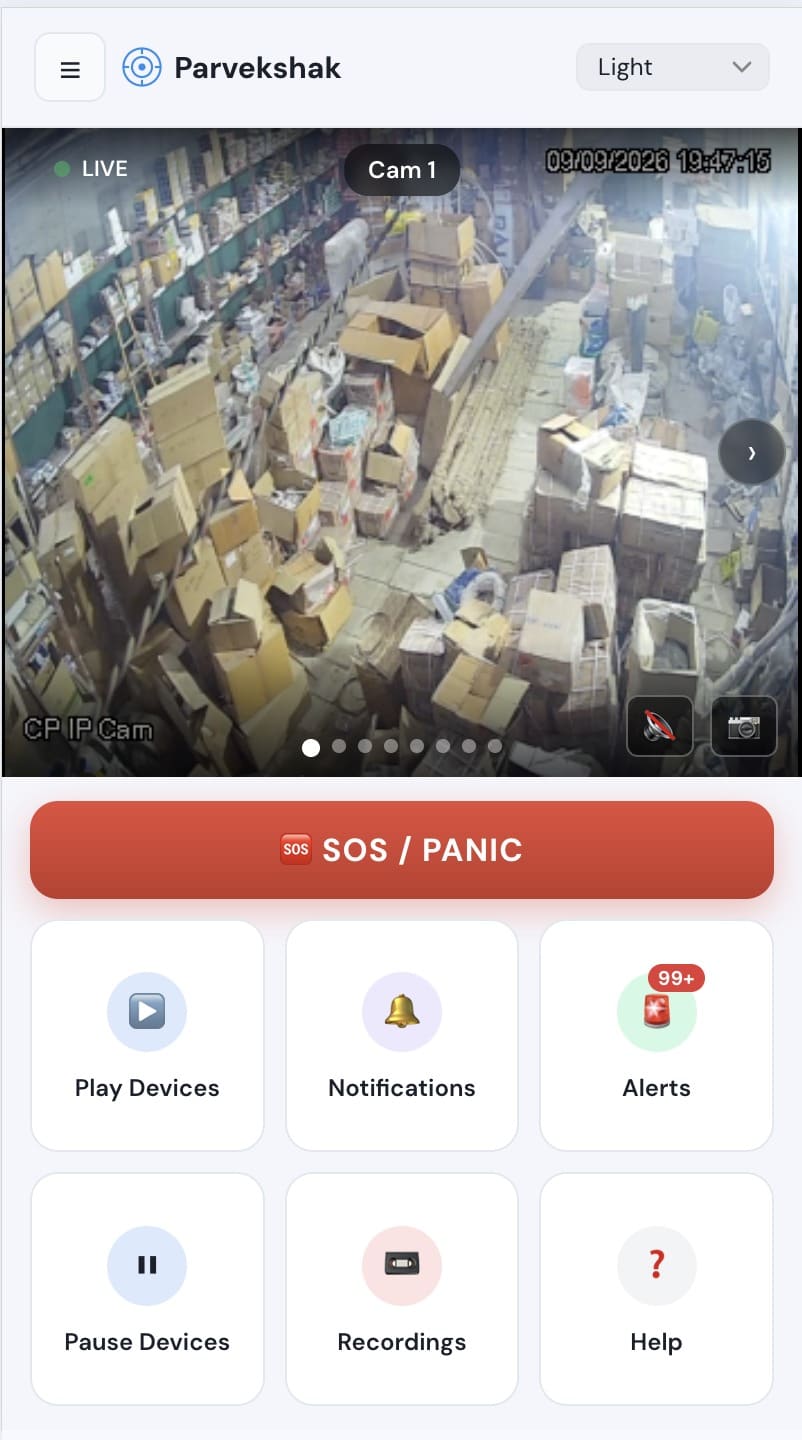
Mobile & Dashboard Notifications
- Detects
- Not a detection — delivery. Events pushed to the people who need them, wherever they are.
- Where it helps
- Phones for the owner, supervisor or on-call responder; the dashboard for the desk.
- Example
- A critical event reaches three people at once while the site is empty.
- Configurable response
- Push notification with the frame · live view · SOS and panic raised from the app.
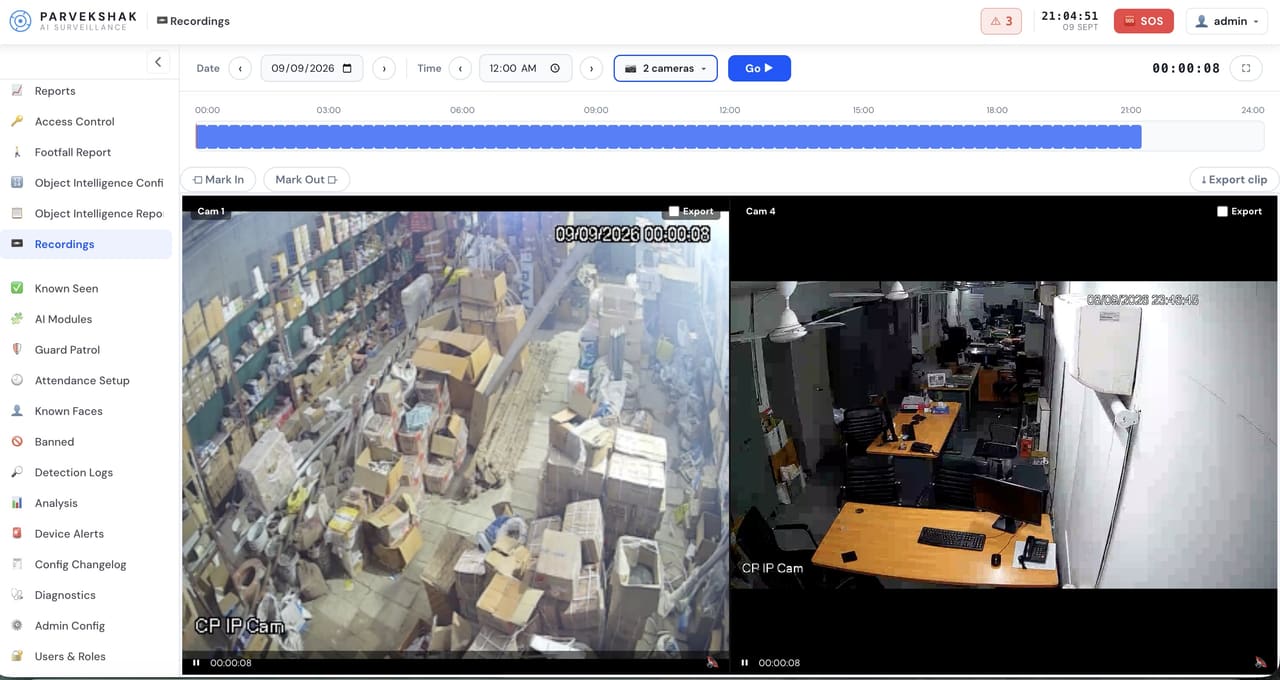
Evidence Clips & Reporting
- Detects
- Not a detection — the record. Every event connected to the footage behind it.
- Where it helps
- Across every camera and capability in use.
- Example
- A month-end review, or an incident that has to be reconstructed exactly.
- Configurable response
- Frame, clip, time and context per event · playback and export · reports kept on the appliance.
A camera records the room. A zone watches it.
Your store rooms, server or records room, plant rooms and entrances are already on camera. What is missing is a rule: which area, during which hours, and who is allowed in it. PARVEK marks each one as a zone and alerts the security desk the moment it is broken — not three weeks later when someone reviews the footage.
A polygon drawn on the camera view — the racks or the cabinet, not the whole frame.
Working hours, night only, or always.
Enrolled staff only, a named list, or nobody after hours.
Security desk, in seconds, with the clip — and the area can answer back with voice and light.
Zones we set up on day one
Every zone is marked with your team during the assessment.
| Zone | Watched for | Severity | Configured response |
|---|---|---|---|
| Store, Inventory & Pharmacy Stock racks, medicine store, equipment cage | Entry outside permitted hours · a person at the racks who is not enrolled staff · loitering at the racks | Critical | Local voice warning · mobile alert · evidence clip |
| Server Room, Records & Cash Office Staff-only, named-list rooms | Entry outside permitted hours · an enrolled person not on that room’s list · prolonged loitering | Critical | Mobile alert to security desk · evidence clip |
| Plant & Utility Rooms DG, electrical panels, oxygen manifold, boiler | Flame or smoke near the plant · unauthorized presence in the room | Critical | Mobile alert · evidence clip · maintenance notified |
| Work Areas, Wards & Corridors Shop floor, ICU approach, office floor | A person without required PPE · a person down on the floor · crowding beyond the set limit · an unfamiliar person in a staff-only corridor | High | Voice reminder in the zone · supervisor alert · compliance report |
| Main Gate, Lobby & Reception Entry, visitor area, casualty entrance | A face on the banned list · an unknown person after hours · vehicles and people in and out · attendance events | High | Alert with matched photo · vehicle log · attendance report |
| Loading Dock & Dispatch Trucks, boxes, receiving, stores exit | Goods moving out outside dispatch hours · unfamiliar person at the dock · box count that does not match the note | High | Mobile alert · evidence clip · dispatch report |
| Perimeter & Boundary Walls, rear gates, parking, service entry | Intrusion after dark · a person where no person should be · loitering along the boundary at night | Critical | Voice warning · floodlight · siren · alert |
Restricted zone breached — what the area does
Off-limits to everyone in those hours, staff included.
- 0s Detected
A person inside a restricted zone, outside permitted hours.
- +2s Local voice warning
The speaker in that area challenges them — nowhere else.
- +3s Light in that area
The zone lights up. They know they have been seen.
- +5s Silent alert + clip
Security desk and management. Siren and floodlight only where the site permits.
Detection is only the first step
An alert on a phone is not much use at 3 AM if nothing happens on site. PARVEK can trigger the response the premises allows — a voice warning in that area, the light, the siren — and keep the evidence either way.
- AI detects On the appliance
- Voice warning In that area
- Floodlight / siren Where permitted
- Mobile alert With the frame
- Evidence Clip kept on site
Speaker / Voice Warning
A local warning in the area that was breached — challenging the person where they are, not across the whole site.
Siren / Hooter
Audible escalation where the site permits it, linked to confirmed events rather than every movement.
Floodlight / Light
The area lights up as configured, deterring the person and giving the camera a usable image.
Mobile Alert
A notification to the security desk, owner or management with the frame that triggered it.
Evidence Clip
The video around the event, kept on the appliance for verification and follow-up.
Reports
Compliance, attendance, counting and operational records available from the console.
Response devices are installed and configured per site. Sirens and floodlights are used only where the premises permits them.
Frequently Asked Questions
Are all of these available on every deployment?
No, and that is deliberate. Capabilities are selected per site during the assessment and configured at commissioning — a home runs a handful, a plant may use all three groups. Several depend on camera placement, lens and lighting to work well, which is part of what the assessment establishes.
Can we add capabilities later?
Yes. Once the cameras and the appliance are in, additional capabilities are a configuration change rather than new hardware — subject to the cameras covering the right areas well enough.
How accurate is the detection?
Accuracy depends on the camera, the lighting, the angle and the scene. That is why deployments start with an assessment and end with tuning on your own footage rather than a benchmark. AI surveillance and analytics are technology-assisted and do not guarantee prevention or detection of every security incident or 100% accuracy.
Does face recognition mean our data goes somewhere?
No. Enrolled faces, clips and reports are held on the appliance inside your premises, and users and roles control who can see what. Biometric regulation varies by jurisdiction, so confirm your obligations with counsel — the system is useful with recognition disabled, using areas, timing and person detection alone.
What triggers a physical response rather than just an alert?
You decide, per area. A common configuration is a local voice warning and light in the area that was breached, with a silent alert and clip to the desk — keeping sirens and floodlights for the perimeter and only where the site permits them.
AI surveillance and analytics are technology-assisted and do not guarantee prevention or detection of every security incident or 100% accuracy.